




Instructions for registering a user account for unlimited use of the Mystore Zoki dictionary through the Quizlet Plus application
Approach learning a foreign language in a whole new way!
With our Premium Plus service and Quizlet Plus app, learning new words becomes faster, easier and accessible anytime.
So that you can use unlimited Quizlet Plus – the application, as well as ours Mystore Zoki platform for learning new words, you need to log in on us Premium Plus German grammar course or to apply only for Quizlet Plus - an application for learning new words and expressions.
Creation and registration of a user account for unlimited use Quizlet you can complete the application quickly by following the instructions in a few simple steps:
1. In the inbox of your email account, you will find one of the invitations you previously received from us, for example: "German language, first 10000 words (A1-B2), to access our teaching platform within the Quizlet application".
2. Confirm acceptance of the invitation by clicking on the blue box "Accept".
3. In the next step, the platform Quizlet directs you to create a personal user account. You can create a user account in three ways: using your email address, Google account or Facebook account (the application will ask you to choose one of the offered options).
- If you use an email address to register an account, you need to fill in the attached white fields (enter your email address, specify a username, password for Quizlet, and provide your date of birth).
- If you want to register your user account through a Facebook or Google account, just click on the offered option "Continue with..."
4. After choosing the method of creating an account, you need to confirm that you accept Quizlet rules and regulations - by checking the box that is the last in a series of three offered.
The previous two fields “I am a teacher“ and “"I am a parent", leave blank, as shown in the image.
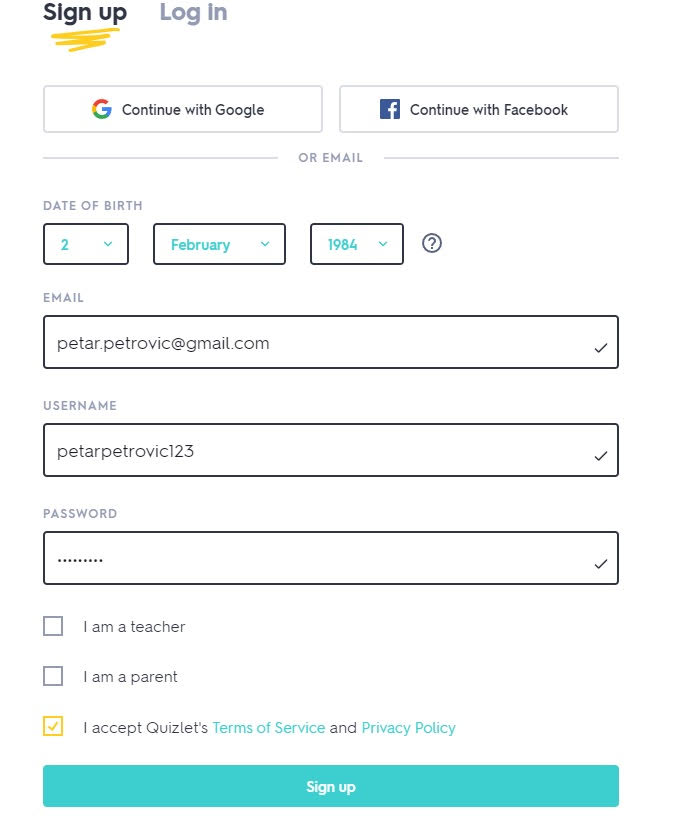
You confirm all this by clicking on the blue box "Sign up".
5. The next step is to select an option "Continue to free Quizlet" which is shown in a dark blue box. Do not select or confirm the option in the yellow box "Start your free trial"“. Otherwise, after 7 days, Quizlet will request an additional payment to use the application.
6. After selecting the option “Continue to free Quizlet“", once again confirm your choice by clicking on the blue box "Accept".