




Instructions for the mandatory registration of the user's Zoom account
A step to knowledge at your fingertips!
Register your Zoom account through our invitation and unlock access to video lessons and exclusive classes.
Video books with lessons within our Premium Plus services, as well as recorded lessons from a grammar course and a live conversation course, you can use and watch only after registration user's Zoom account!
Your user account must be created via our invitation, which you previously received at your email address. The user account remains valid only for Premium students with an active subscription.
Please follow the following steps:
1. In the inbox of your email account you will find our invitation called "“Zoom account invitation“.
2. Confirm acceptance of the invitation by clicking on the blue box "“Approve the Request".
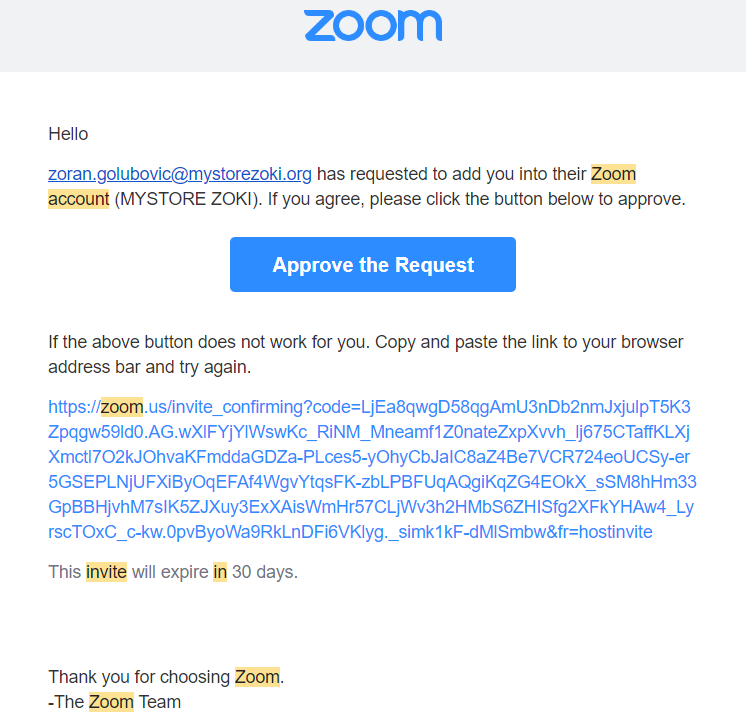
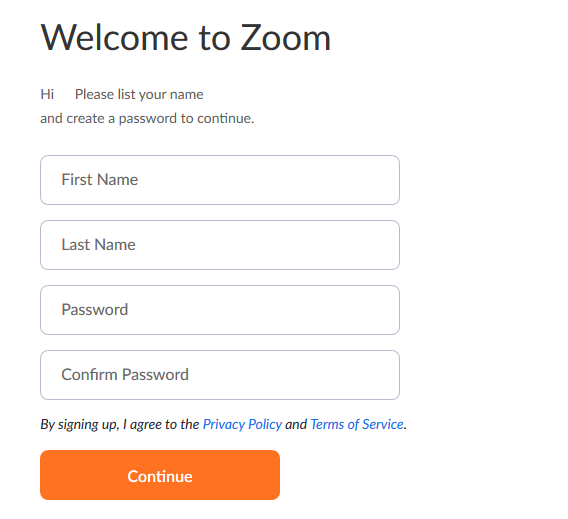
3. Platform Zoom Directs you to create your user account. You can create a user account in two different ways:
The first way:
You create your account by specifying your own username and password.
-In the field "„First name“"Enter your name.".
-In the field "„Last name“"Enter your last name.".
-In the field "„Password“" enter the desired password.
-In the field "„Confirm password“" re-enter password the same password to confirm.
Finally, confirm your entries by clicking on the field "Continue".
Another possible way:
Choose one of the offered icons under the field "„Continue“" and register your Zoom account through a Google or Facebook account (if you have a Gmail or Facebook account).
How to register a user's Zoom account using a Google account and our invitation
After opening our invitation and confirming that you accept it, select the "Continue" option (orange box)
Click the button „"Sign in with Google"“ to register using your existing Google account.Sign in to your Google account
If you are not already signed in, enter your Gmail address and password. If so, just select the account you want to link.Allow access to the Zoom platform
Zoom will ask you to authorize access to basic data from your Google account. Click on „"Allow"“ (Allow).Registration completed
After successful connection, your Zoom account will be registered, and your connection with our school will be activated.
In this way, you get access to all recordings and lessons that are intended for you.
How to register a user Zoom account via Facebook order and our invitations
Open our invitation and confirm that you accept it, then click on „"Sign in with Facebook"“.
Log in to your Facebook account.
Give Zoom permission to use your name and email.
You will be automatically registered and logged in.